How to Remove Fitbit Charge 5 Band: Step-by-Step Guide
Knowing how to remove Fitbit Charge 5 band sections is useful when you want to replace a worn strap, clean your fitness tracker or change its appearance. The Fitbit Charge 5 has detachable band sections that connect to the tracker through a release mechanism. Once you understand how this mechanism works, you can usually remove the straps at home without specialist equipment, complicated tools or professional assistance.
The key is to work carefully and avoid forcing the connections. Whether you are preparing to fit a replacement band or simply cleaning your device, the correct technique helps protect the tracker housing and strap connectors. This guide explains how to remove both sections, attach a compatible replacement, deal with a stuck strap and maintain your Fitbit Charge 5 so it remains comfortable and secure during everyday use.
What You Need Before Removing Your Fitbit Charge 5 Band
Before learning how to remove Fitbit Charge 5 band sections, prepare a clean, stable working surface. Place a soft, lint-free cloth on a table to help protect the screen and casing from scratches. Wash and dry your hands so that dirt, sweat or moisture does not transfer to the tracker or collect around the connection points while you work.
You generally do not need specialist tools to remove a standard Fitbit Charge 5 band. Your fingers should be sufficient to operate the release mechanism and slide the strap away from the housing. Avoid using knives, screwdrivers or metal picks, as these can damage the connector or casing. If the band feels unusually tight, pause and check the release mechanism rather than applying additional force.
How to Remove Fitbit Charge 5 Band Step by Step
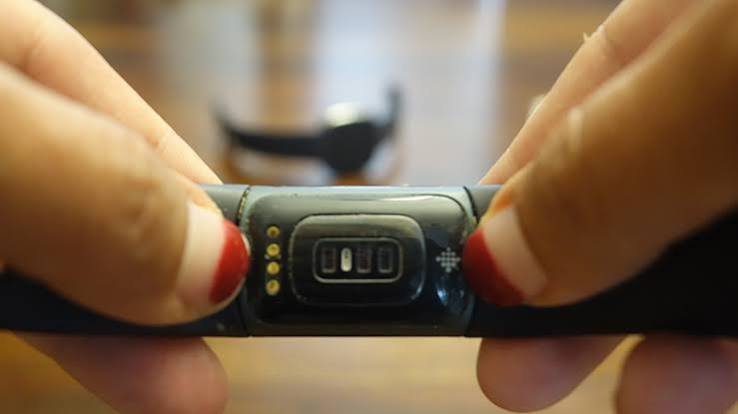
Begin by turning your Fitbit Charge 5 over so that the rear sensors and band attachment points are visible. Rest the tracker on the soft cloth, ensuring that it cannot slide across the surface. Examine the area where the first strap section joins the tracker body, and locate the small, flat release mechanism at the connection.
Press the release mechanism towards the strap as designed, keeping it engaged while gently sliding the band section straight away from the tracker housing. Avoid pulling upwards or twisting the connector unnecessarily. Once the first section comes free, set it aside and repeat the same process at the opposite end. Both sections should release without excessive force when the mechanism is operated correctly.
Remove Both Strap Sections Safely
After removing the first section, inspect the exposed attachment point before moving to the other side. Look for visible dirt, cracks or signs of damage that could interfere with a replacement strap. Keeping the tracker steady while working helps prevent accidental drops and reduces unnecessary pressure on the remaining connection.
Repeat the release process for the second strap section, pressing its mechanism and sliding the band away from the housing. Understanding how to remove Fitbit Charge 5 band sections correctly makes changing straps easier and helps protect the connectors. If either section refuses to move, stop and reassess the release mechanism instead of pulling harder or using an object to prise it free.
How to Attach a New Fitbit Charge 5 Band
Before fitting a replacement, check that the band is specifically compatible with the Fitbit Charge 5. Replacement straps come in different designs and materials, but not every Fitbit band fits every model. Read the product description carefully and compare the connector design before installation. Choosing the correct replacement prevents problems caused by incompatible attachment points or incorrectly sized components.
Align the connector of the new strap with the appropriate slot on the tracker, then slide it into place according to the manufacturer’s instructions. Check that the section sits evenly and is securely attached before repeating the process on the other side. Once both sections are installed, gently inspect the connections to ensure that neither strap is loose. Do not wear the tracker if a connector appears damaged or fails to secure properly.
How to Remove a Stuck Fitbit Charge 5 Band
A Fitbit Charge 5 band may feel stuck if the release mechanism is not fully engaged, the connector has accumulated dirt or a component has become damaged. Start by checking your finger position and making sure you are pressing the correct release area. Keep the tracker supported on a soft surface and try the normal removal movement again using controlled pressure.
If the strap remains stuck, a very small side-to-side movement may help while the release mechanism is engaged, provided the connector is not being forced. Do not use sharp tools, excessive twisting or strong pulling to remove the band. If the release button appears broken or the strap remains firmly attached, contact Fitbit support or a suitable repair professional to avoid causing further damage.
Common Mistakes to Avoid During Strap Removal
One of the most common mistakes is pulling the band before releasing its connector. This places unnecessary strain on the attachment point and may damage the strap or tracker housing. Another mistake is pressing the release mechanism incorrectly and assuming that extra force will solve the problem. Take your time, keep the device steady and confirm that the mechanism is engaged before sliding the strap away.
Avoid using knives, metal picks, pliers or other tools that could scratch the casing or damage small components. Do not twist the strap aggressively, bend its connector or attempt to dismantle the tracker body. When following instructions for how to remove Fitbit Charge 5 band sections, remember that a properly operated release mechanism should allow removal without force. Stop immediately if you notice cracking, unusual resistance or visible damage.
How to Clean and Maintain Your Fitbit Charge 5 Band
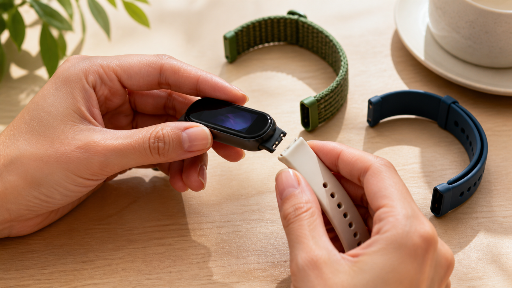
Regular cleaning helps remove sweat, dust and everyday residue that accumulate during exercise and normal wear. Follow Fitbit’s care instructions for the tracker and the specific material of your band. Use only suitable cleaning methods, and avoid harsh chemicals or abrasive materials that could damage the strap’s surface or affect its finish. Pay particular attention to the attachment areas, where debris may collect over time.
If you remove the band for cleaning, make sure the strap and connector areas are dry before reattaching them. Inspect the band periodically for cracks, loose connections, stretching or other signs of wear. A damaged strap may not hold the tracker securely, increasing the risk of it falling off during use. Replacing a worn band promptly is a practical way to maintain comfort and help protect your fitness tracker.
How to Choose a Compatible Fitbit Charge 5 Replacement Band
Choosing a suitable replacement involves more than selecting a colour you like. Consider the material, comfort, durability and intended use of the strap. Silicone bands are popular for exercise because they are generally easy to clean, while other materials may suit everyday outfits or different personal preferences. If you have sensitive skin, pay attention to the material description and stop using any band that causes irritation.
When shopping for Fitbit Charge 5 replacement bands in the UK, verify the model compatibility before placing an order. Check product photographs, connector details, seller information and the returns policy. Do not assume that a strap designed for another Fitbit Charge model will fit correctly. A compatible band should align with the attachment points and secure properly without requiring force, modification or improvised tools.
Conclusion
Learning how to remove Fitbit Charge 5 band sections is straightforward when you use the correct release mechanism and handle the device carefully. Turn the tracker over, locate the connection, press the release mechanism and slide the strap section away from the housing. Repeat the same process for the opposite side, keeping the device supported and avoiding unnecessary twisting or pulling.
When attaching a replacement, check compatibility and confirm that both sections are securely connected before wearing the tracker. Keep the attachment points clean, follow the manufacturer’s care guidance and replace any strap that shows significant damage. If a band remains stuck or its release mechanism appears faulty, seek appropriate assistance rather than forcing the connection. These precautions help protect your Fitbit Charge 5 and make future strap changes easier.
Frequently Asked Questions
How do you remove a Fitbit Charge 5 band?
Turn the tracker over, press the release mechanism where the strap connects and gently slide the strap section away from the housing. Repeat for the other side.
Does the Fitbit Charge 5 band have a release button?
Yes. Each band connection has a release mechanism that allows the strap section to detach when operated correctly.
Can I remove my Fitbit Charge 5 strap without tools?
Yes. Standard band removal normally requires only your fingers and careful handling. Avoid sharp tools or excessive force.
Why is my Fitbit Charge 5 band stuck?
The release mechanism may not be fully engaged, or the connector may be dirty or damaged. Try gentle pressure, but stop if the strap does not move.
How do I attach a new Fitbit Charge 5 band?
Align a compatible strap connector with the correct slot and slide it into place according to the manufacturer’s instructions. Check that it is secure before wearing the tracker.
You May Also Read: ARC Toolkit