Digital Marketing Report Template Excel: Free Download
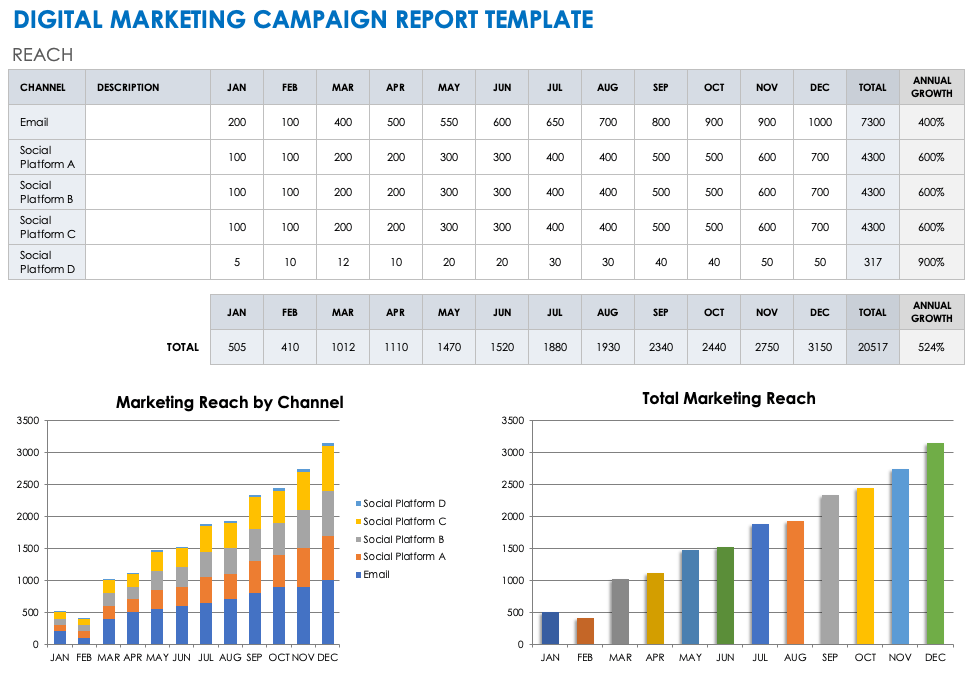
Understanding marketing performance is essential for businesses that want to increase sales, attract customers and improve their online presence. A digital marketing report template excel provides a practical way to organise campaign information, measure results and monitor marketing expenditure. Instead of switching between different analytics platforms, businesses can bring important performance figures into one structured spreadsheet, making it easier to understand campaign progress and identify opportunities for improvement.
For UK businesses, digital marketing reporting plays an important role in managing budgets and evaluating marketing strategies. Excel offers familiar tools for recording website traffic, advertising performance, customer enquiries and conversion rates. Whether you operate a small company, manage an agency or work independently, a properly organised marketing report helps transform complicated figures into useful insights that support better decisions and long-term business growth.
What Is a Digital Marketing Report Template in Excel?
A digital marketing report template excel is a pre-designed spreadsheet that helps businesses collect, organise and analyse marketing campaign information. It usually contains separate sections for website analytics, search engine optimisation, paid advertising, social media and email marketing. By combining these measurements, marketers can evaluate campaign effectiveness without creating an entirely new reporting system every month, saving time while maintaining consistent performance records.
Unlike basic spreadsheets that simply store figures, a marketing reporting template can include formulas, charts and performance summaries. These features help users compare reporting periods, calculate advertising returns and identify successful campaigns. For example, a marketing manager can compare organic website visits with paid advertising conversions to understand which channels contribute most effectively towards business objectives and customer acquisition.
Digital Marketing Report Template Excel Free Download
Finding a suitable digital marketing report template excel free download can simplify the reporting process for marketing professionals and business owners. A useful template should provide editable worksheets, clearly labelled performance indicators and organised sections for different marketing channels. Businesses should also look for built-in calculations and charts that make campaign results easier to interpret without requiring advanced spreadsheet knowledge.
Several established providers offer free reporting resources, including Smartsheet, Microsoft Excel templates and Supermetrics. Before choosing a workbook, check whether it supports your required marketing metrics and reporting periods. Download the available Excel file, review its formulas and customise the worksheets to match your business objectives, campaign structure and preferred reporting format.
Essential Features of a Digital Marketing Report Template
An effective digital marketing report template excel should include a clear overview of campaign performance and important marketing indicators. Essential measurements include website sessions, organic traffic, advertising expenditure, conversions, leads and revenue. A summary dashboard helps users recognise performance changes quickly, while individual worksheets provide additional details about each marketing channel, allowing teams to investigate specific results without overcrowding the main report.
Customisable charts, automatic calculations and monthly comparisons make reporting more efficient. For instance, a line chart can demonstrate website traffic growth, while a column chart can compare advertising results across different campaigns. Including performance targets alongside actual results also helps businesses determine whether their marketing activities are meeting expectations and where additional attention or investment may be necessary.
How to Create a Digital Marketing Report in Excel
Creating a digital marketing report template excel begins with establishing measurable marketing objectives. Businesses should identify whether they want to improve search visibility, increase enquiries, generate online purchases or reduce customer acquisition costs. Once these objectives are clear, marketers can select relevant performance indicators and create dedicated worksheets for each marketing channel, ensuring that collected information supports meaningful analysis rather than unnecessary reporting.
The next stage involves gathering information from trusted analytics sources, including Google Analytics 4, Google Search Console, Google Ads and social media platforms. Enter the information into Excel using consistent dates and measurement units. Apply formulas to calculate conversion rates, advertising costs and performance changes, then create a dashboard displaying the most important results for stakeholders and decision-makers.
Different Types of Digital Marketing Report Templates
A digital marketing report template excel can be adapted for several reporting purposes. Monthly marketing reports provide a broad overview of campaign performance, while weekly reports help teams monitor ongoing activities. SEO reporting templates focus on organic search traffic, keyword visibility and website engagement, whereas PPC reporting spreadsheets concentrate on advertising expenditure, clicks, conversions and return on advertising spend.
Social media reporting templates measure audience reach, engagement and campaign interactions across platforms. Email marketing reports track delivery rates, click-through rates and conversions. Marketing agencies may also require client reporting templates that combine multiple channels into professional summaries. Selecting the appropriate format ensures that each report contains relevant information and communicates results clearly to its intended audience.
Important Marketing KPIs to Include in Excel Reports
Every digital marketing report template excel should contain key performance indicators that reflect specific business goals. Website traffic shows how many visits a campaign generates, while conversion rate measures the proportion of relevant interactions resulting in desired actions. Cost per acquisition indicates how much a business spends to obtain a customer or conversion, helping marketers evaluate campaign efficiency and budget allocation.
Return on advertising spend is another useful measurement, particularly for businesses investing in paid campaigns. It compares advertising-attributed revenue with advertising expenditure. For example, generating £2,000 in attributed revenue from £500 of advertising spend produces a return on advertising spend of four times. Monitoring these figures alongside lead quality and customer value provides a more complete understanding of marketing effectiveness.
How to Build a Digital Marketing Dashboard in Excel
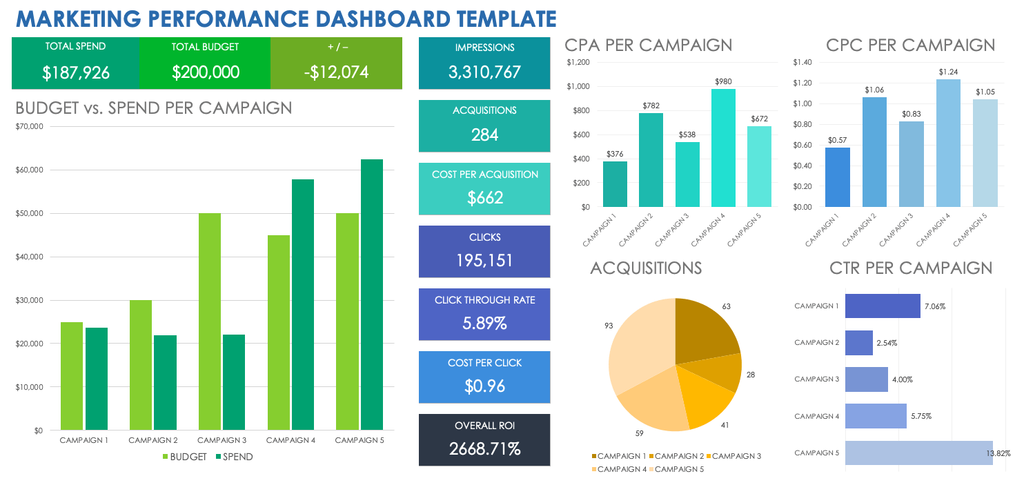
A digital marketing report template excel becomes more valuable when important information is presented through a clear dashboard. Excel provides charts, PivotTables, conditional formatting and formulas that help transform large datasets into accessible visual summaries. A well-designed dashboard should highlight the most relevant KPIs, display performance trends and make it easy to compare results across campaigns or reporting periods.
Start by separating raw marketing data from calculations and visual summaries. Use line charts for traffic trends, column charts for campaign comparisons and KPI cells for important figures. Keep labels consistent and avoid excessive colours or unnecessary graphics. This approach helps business owners, marketing managers and clients understand campaign results quickly without examining every individual spreadsheet entry.
Best Practices for Digital Marketing Reporting in Excel
Using a digital marketing report template excel effectively requires accurate information, consistent reporting periods and carefully selected performance indicators. Businesses should establish a regular reporting schedule and verify figures before presenting results. Comparing current performance with previous months or agreed targets makes it easier to identify meaningful changes, understand campaign effectiveness and recognise potential problems before they become expensive.
Reports should also explain the reasons behind important performance changes rather than presenting statistics alone. For example, an increase in website traffic may result from improved search rankings, seasonal demand or additional advertising expenditure. Adding brief observations and recommended actions helps stakeholders understand what happened, why it matters and how future marketing activities could be improved.
Common Digital Marketing Reporting Mistakes to Avoid
Even a carefully designed digital marketing report template excel can become unreliable when information is collected incorrectly. Common problems include inconsistent date ranges, duplicated conversions, missing advertising costs and outdated formulas. Mixing data from different attribution systems without explanation may also create misleading comparisons, particularly when advertising platforms and website analytics report different conversion totals for the same campaign.
Another mistake involves measuring too many indicators without connecting them to business objectives. High website traffic does not automatically indicate marketing success if visitors fail to make enquiries or purchases. Effective reporting should prioritise meaningful outcomes, explain unusual results and identify practical improvements. Regular spreadsheet checks and consistent measurement definitions help maintain reliable reports that support confident decision-making.
Benefits of Using Excel for Marketing Performance Reports
A digital marketing report template excel offers businesses flexibility, affordability and control over marketing information. Excel allows users to customise reporting layouts, create calculations and maintain historical campaign records. Small businesses and freelancers can benefit from these features without immediately investing in expensive reporting platforms, while marketing agencies can adapt their spreadsheets for different clients and campaign requirements.
Another advantage is the ability to analyse performance over longer periods. By maintaining consistent monthly records, businesses can identify seasonal patterns, compare advertising expenditure and evaluate marketing growth. Excel also supports data imports and advanced analytical functions, making it suitable for both straightforward reporting and more detailed campaign analysis as business requirements develop.
Conclusion
A digital marketing report template excel provides a reliable foundation for organising campaign information, monitoring essential KPIs and evaluating marketing performance. By combining website analytics, advertising results and conversion data within one workbook, businesses can identify successful activities and recognise areas requiring improvement. Consistent reporting also supports better communication between marketing teams, business owners and clients.
Choosing an appropriate template is only the beginning of effective marketing reporting. Accurate information, meaningful calculations and clear performance explanations are equally important. Businesses that regularly review their marketing reports can make more informed budget decisions, improve campaign strategies and establish a clearer understanding of how digital marketing contributes to sustainable business growth.
Frequently Asked Questions
What is a digital marketing report template in Excel?
It is an editable spreadsheet used to organise marketing data, monitor campaign performance and measure important business KPIs.
Where can I download a free marketing report template?
Free marketing reporting templates are available from providers such as Smartsheet, Microsoft and Supermetrics.
Which KPIs should a digital marketing report include?
Important KPIs include website traffic, conversion rates, advertising expenditure, cost per acquisition and return on advertising spend.
Can Excel automatically calculate marketing performance?
Yes, Excel formulas, PivotTables and charts can calculate performance metrics and update visual summaries when the underlying data changes.
Is Excel suitable for monthly digital marketing reports?
Yes, Excel is suitable for monthly marketing reports, particularly for small businesses, freelancers and agencies managing campaign performance data.
You May Also Read: What Is a Subagent in Texas Real Estate