PayPal Express Checkout: How It Works, Benefits and Setup Guide
PayPal Express Checkout is a payment integration approach designed to make online shopping quicker and more convenient. It allows eligible customers to use their PayPal accounts to approve purchases without repeatedly entering payment and delivery details. For shoppers, this can simplify the checkout process, while businesses can offer a familiar payment option that fits into their existing online store. It is particularly useful for customers who value convenience when purchasing products or services from websites.
PayPal has introduced newer checkout experiences and integration options over time, so the precise features available depend on the product, platform and implementation. Businesses planning to add PayPal payments should check the current official documentation before choosing an integration. This is especially important for new websites, as older Express Checkout implementations may use legacy technology that differs from the solutions currently recommended for developers.
How Does PayPal Express Checkout Work?
The process generally begins when a customer selects a PayPal checkout button on a product page, shopping basket or checkout screen. Depending on the integration, the customer signs in to PayPal or completes the required authentication before reviewing available payment and delivery details. Using saved information can reduce repetitive form filling, making the purchasing journey more straightforward for returning customers who want to complete their orders efficiently.
After reviewing the order, the customer approves the payment and returns to the merchant’s website when required. The business must then confirm the transaction status through the appropriate payment process before treating the order as paid. Understanding payment approval, authorisation and capture is important because these stages are not always identical. A successful customer redirect alone does not necessarily mean that the payment has been captured or that the order is ready for dispatch.
Key Features of PayPal Express Checkout
One of the main attractions of PayPal Express Checkout is the convenience of using information already associated with an eligible PayPal account. Depending on the integration, customers may be able to select a saved delivery address and an available payment method rather than entering every detail manually. This can make the experience more efficient, particularly for shoppers using mobile devices or returning to a retailer they have purchased from previously.
Modern PayPal checkout solutions may also support different payment methods, configurable buttons and integration options for compatible online shops. Merchants can choose an approach that suits their website, technical resources and customer requirements. However, features are not identical across all PayPal products, countries or platforms. Reviewing the current product documentation helps businesses understand which options are available and avoid relying on outdated setup instructions.
Benefits of PayPal Express Checkout for Online Shoppers
For online shoppers, PayPal Express Checkout can make purchasing more convenient by reducing the need to enter payment information repeatedly. Customers who already use PayPal may appreciate being able to review their available payment options and delivery details through a familiar account. A clear checkout experience also allows buyers to confirm the order total and relevant information before completing a transaction, helping them understand what they are agreeing to purchase.
Another advantage is the potential for a more straightforward experience across supported devices. A well-designed checkout can be easier to navigate on a mobile phone, tablet or desktop computer, particularly when customers are shopping away from home. Nevertheless, convenience depends on the retailer’s website, the customer’s account and the specific integration. Shoppers should always review delivery charges, payment details and the final total before approving an order, regardless of which payment method they choose.
Benefits of PayPal Express Checkout for Businesses
Businesses can use PayPal Express Checkout to provide customers with another familiar way to pay online. Offering a recognised payment option may appeal to shoppers who prefer using an existing PayPal account rather than entering card details directly on every website. A simpler purchasing journey can also reduce some checkout obstacles, although the effect on sales depends on the audience, product range, pricing and overall quality of the shopping experience.
Merchants should evaluate the service alongside their existing payment options, transaction costs and technical requirements. Monitoring checkout completion rates, failed transactions and customer feedback can help determine whether adding PayPal improves the purchasing process. It is important not to assume that installing a payment button will automatically increase revenue. Clear product information, transparent delivery charges, reliable customer support and a well-designed website remain essential parts of a successful online shop.
How to Set Up PayPal Express Checkout
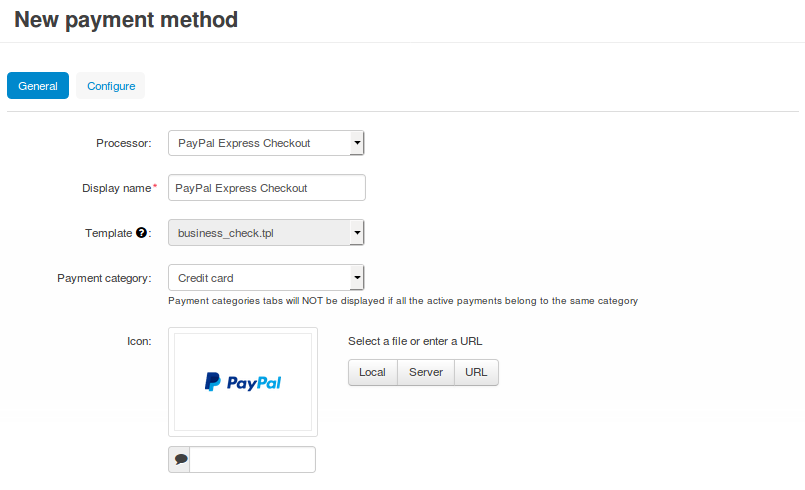
Setting up PayPal Express Checkout depends on the e-commerce platform and the integration method available to your business. Start by reviewing PayPal’s current checkout products and identifying an option compatible with your website. You may need an eligible PayPal Business account and access to the store’s payment settings. Follow the official instructions for your platform, because the process can differ between hosted shops, supported plugins and websites built using custom code.
Once the integration is connected, check that the payment button appears correctly and that customers can complete the intended checkout journey. Test successful payments, cancellations and unsuccessful transactions using the testing facilities available for your integration. Confirm that the order status updates correctly in the store and that payment records match the information in PayPal. Testing these scenarios before launching helps identify configuration problems and reduces the risk of confusing customers or processing orders incorrectly.
PayPal Express Checkout for Shopify and Other Platforms
Shopify merchants should review the payment options available in their store’s current settings and follow Shopify’s instructions for connecting PayPal. The exact process depends on the available configuration and account requirements. Before making the option available to customers, confirm that the account connection is complete, review the relevant settings and check how the checkout appears on desktop and mobile devices. Platform documentation should take priority over older tutorials that may describe features no longer available.
Businesses using WooCommerce, Adobe Commerce or a custom-built website should investigate the integration methods officially supported by their platform. A maintained plugin or partner integration may be easier to manage than a fully custom implementation. Developers building their own checkout should use current PayPal API documentation, protect credentials and validate transactions securely on the server. Choosing a supported integration from the beginning can simplify future maintenance and reduce the risk of compatibility problems following platform updates.
PayPal Express Checkout Fees in the UK
The cost of accepting PayPal payments depends on the payment product, transaction type, merchant agreement and applicable pricing schedule. A checkout option may have no separate setup or monthly fee while still involving transaction charges when a business receives commercial payments. Merchants should therefore distinguish the cost of activating an integration from the fees associated with processing actual purchases. Understanding this difference makes it easier to estimate the cost of accepting payments through an online shop.
UK businesses should consult PayPal’s current merchant fee information before choosing a payment solution. Charges may vary depending on the transaction and circumstances, while currency conversion, refunds and disputes can affect overall costs. Comparing the applicable fees with those of other payment providers can help merchants make an informed decision. Businesses should also consider customer preferences, the payment methods they need to support and the time required to maintain their chosen checkout integration.
Is PayPal Express Checkout Safe?
PayPal provides security measures designed to support online payments, including account authentication and transaction monitoring. Using an established payment provider can help businesses manage parts of the payment process, but no payment method eliminates every risk. Customers should make sure they are using the genuine PayPal service, review the order details carefully and avoid sharing passwords or verification codes in response to suspicious messages, emails or unexpected requests.
Merchants also have responsibilities when integrating a payment system. They should keep their website software and payment extensions updated, protect API credentials and restrict access to authorised staff. Payment status should be confirmed through the appropriate server-side process rather than relying solely on a browser redirect. Customers and sellers should also review PayPal’s applicable protection policies, because buyer and seller protection have specific eligibility requirements, conditions and exclusions.
Common PayPal Express Checkout Problems and Solutions
Sometimes PayPal Express Checkout may not appear on a website, or customers may experience errors when attempting to pay. Common causes include an incomplete account connection, unsupported configuration settings, compatibility issues or payment restrictions. Start by checking the exact error message and reviewing the payment settings in your store. If a recent update coincides with the problem, consult the relevant platform documentation before changing multiple settings, as this can make the cause harder to identify.
If a payment fails, review the transaction status in PayPal and your store’s order records before asking the customer to try again. This helps prevent duplicate orders or repeated payment attempts when the status is uncertain. If buttons or redirects are not working, check plugin compatibility, recent updates and available error logs. Persistent issues may require assistance from PayPal support, your e-commerce platform or a developer familiar with the integration you are using.
PayPal Express Checkout vs Standard PayPal Checkout
The terminology around PayPal checkout can be confusing because the company has introduced newer products and integration methods over time. Older Express Checkout integrations may rely on legacy APIs, while newer PayPal Checkout solutions can offer different implementation routes and customisation options. Although these approaches share the goal of supporting online payments, they should not automatically be treated as identical when following technical instructions or planning a new website.
The most suitable option depends on your e-commerce platform, preferred payment methods, technical resources and long-term maintenance needs. A supported integration may be easier to manage than a custom-built solution, while a developer-led implementation can provide greater control over the customer experience. Before choosing, confirm that the product is currently supported and meets your requirements. Businesses maintaining an older integration should also check PayPal’s migration guidance before making changes to a working payment system.
Conclusion
PayPal Express Checkout can make online payments more convenient by reducing repetitive form filling and providing eligible customers with a familiar way to approve purchases. For businesses, it offers an opportunity to provide an additional payment option and simplify parts of the customer journey. However, the precise features, setup requirements, compatibility and pricing depend on the PayPal product and integration being used.
Before implementing a checkout solution, review the current documentation, compare UK merchant fees and test the complete payment process. Pay attention to security, order confirmation and compatibility with your e-commerce platform. Choosing a supported integration and maintaining it carefully can help provide a smoother checkout experience for customers while giving your business a more reliable way to accept online payments.
FAQs
What is PayPal Express Checkout?
PayPal Express Checkout is a payment integration approach that allows eligible customers to approve online purchases using their PayPal accounts.
How does PayPal Express Checkout work?
Customers select PayPal, review their payment and delivery details, approve the purchase and complete the merchant’s checkout process.
Is PayPal Express Checkout free to use?
Merchants may pay transaction fees even when a checkout option has no setup or monthly fee, so current pricing should be checked.
Can I use PayPal Express Checkout on Shopify?
Shopify supports PayPal payment options, but the available setup and features depend on the store’s current configuration.
Is PayPal Express Checkout safe?
PayPal provides payment security features, but customers and merchants should still follow safe practices and review applicable protection terms.
You May Also Read: Violife Vegan Cheese