Facility Management App: 7 Best Apps for Businesses in 2026
Managing commercial buildings, equipment and maintenance requests can become increasingly challenging as a business expands. A facility management app helps organisations coordinate daily operations, organise maintenance schedules, track assets and manage service requests from one central platform. Instead of relying on paperwork, spreadsheets and scattered emails, facility managers can use digital tools to improve visibility, reduce administrative work and keep essential building operations running efficiently.
For UK businesses, choosing the right facility management app can make a significant difference to productivity, maintenance planning and operational costs. Whether you manage an office, school, warehouse or commercial property portfolio, the right software can simplify everyday responsibilities. This guide explores seven facility management apps worth considering in 2026, their key features, potential benefits and the factors businesses should evaluate before selecting a suitable solution.
What Is a Facility Management App?
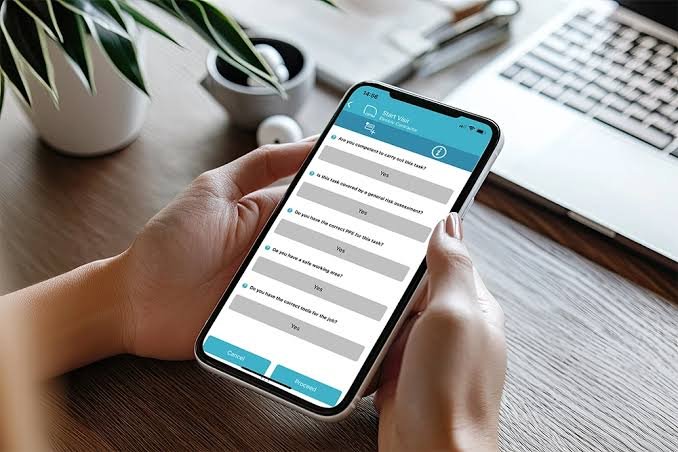
A facility management app is a digital platform that helps businesses manage buildings, equipment, maintenance activities and workplace resources. Depending on the provider, users can create work orders, schedule inspections, monitor asset conditions, record repairs and track maintenance requests through a computer or mobile device. These tools provide a central location for operational information, helping managers understand what needs attention and how work is progressing.
A modern facility management app may also include automated reminders, reporting dashboards, contractor coordination and space management. For example, an office manager could assign a heating repair to a technician, monitor progress and record the completed work without maintaining separate paper records. By bringing these activities together, businesses can improve communication, maintain more accurate records and make better-informed decisions about their facilities.
Key Features to Look for in a Facility Management App
The most useful features depend on the organisation’s size, building type and operational priorities. Work order management is particularly important because it allows employees to report problems, managers to assign responsibilities and technicians to update job statuses. Preventive maintenance scheduling is another valuable capability, helping teams organise recurring inspections, servicing and equipment checks before minor issues develop into expensive breakdowns.
Businesses should also assess asset tracking, mobile access, inventory management and reporting capabilities. A facility management app that stores equipment details, maintenance histories and warranty information can help managers understand the condition of their assets. Mobile functionality allows technicians to access tasks while working on site, while reporting tools provide insights into recurring faults, outstanding requests and maintenance expenditure. Integrations with existing business systems should also be considered before purchasing a subscription.
Best Facility Management Apps for Businesses in 2026
Selecting software becomes easier when businesses compare platforms according to their actual operational needs rather than popularity alone. Some applications concentrate on maintenance workflows and equipment tracking, whereas others offer broader capabilities for managing buildings, room bookings and facility information. The following options provide different approaches to organising maintenance and workplace operations, making them useful candidates for further evaluation.
Before making a final decision, review each provider’s current features, pricing, mobile compatibility and available integrations. Subscription plans can differ significantly, and a feature advertised by a provider may only be available within a particular package. Requesting a demonstration based on real workplace scenarios can help establish whether a platform genuinely supports your organisation’s daily responsibilities.
MaintainX
MaintainX is a maintenance and asset management platform designed to help teams organise work orders, inspections and preventive maintenance. Its mobile-focused approach can be useful for technicians who need to access equipment information, update tasks and document completed work while moving between different areas of a building or facility.
Businesses with equipment-intensive operations may find MaintainX worth evaluating because organised maintenance records can improve visibility into recurring problems and servicing requirements. Before selecting it, assess its reporting capabilities, integrations and subscription restrictions. Consider whether the available tools match your maintenance workflows and whether the platform can accommodate your organisation’s future growth.
UpKeep
UpKeep provides maintenance management capabilities for organisations that need to coordinate work orders, equipment records and preventive servicing. By organising maintenance information in a central system, teams can track outstanding jobs, review previous repairs and plan recurring tasks more consistently across their facilities.
The platform may suit businesses that want to replace manual maintenance processes with digital workflows. When comparing UpKeep with alternatives, examine its asset tracking, inventory management, mobile features and reporting options. The best subscription will depend on your team size, operational complexity and the particular capabilities required to manage equipment effectively.
FMX
FMX offers facility and maintenance management tools that can support work order tracking, preventive maintenance and facility scheduling. It may be particularly relevant to schools, universities and organisations that manage shared buildings, where maintenance responsibilities often overlap with room bookings, events and resource allocation.
Centralising these activities can help administrators monitor requests, coordinate planned work and improve communication between departments. Businesses should assess the available modules, reporting capabilities and mobile experience before choosing FMX. It is also important to establish whether the software supports the specific scheduling requirements and maintenance processes used across their facilities.
Coast
Coast focuses on maintenance workflows, work orders and communication between team members. Its approach may appeal to businesses looking for practical ways to submit maintenance requests, assign responsibilities and monitor task progress without introducing unnecessarily complicated processes.
Smaller organisations and growing maintenance teams may find Coast worth considering when their main priorities are straightforward task coordination and improved visibility. Before committing, review the current subscription plans, available automation features and reporting options. A demonstration can help determine whether its workflows are suitable for your staff and whether it offers sufficient flexibility for changing operational requirements.
AkitaBox
AkitaBox focuses on facility information, asset management and building operations. Its capabilities may help organisations maintain structured records of equipment, building conditions and facility information, particularly when managing complex properties or multiple locations.
For businesses responsible for large buildings, accurate facility information can support maintenance planning and improve understanding of asset locations and conditions. When evaluating AkitaBox, consider its reporting capabilities, implementation requirements and suitability for your property portfolio. Organisations should also assess whether its tools address their wider facility management needs rather than only individual maintenance tasks.
eSPACE
eSPACE provides facility scheduling and space management capabilities that may benefit organisations responsible for shared rooms, events and workplace resources. These functions can be particularly useful for institutions where several departments need to coordinate access to meeting rooms, halls or other facilities.
Businesses should examine which scheduling and operational modules are currently available and whether they align with their requirements. Although room booking can improve resource coordination, organisations with extensive equipment maintenance needs should also check how well the platform supports those responsibilities. Comparing its available functions with alternative systems will help establish whether it offers the right balance of scheduling and maintenance capabilities.
WorkTrek
WorkTrek provides maintenance management tools that help organisations organise work orders, equipment information and operational tasks. A centralised system can give managers a clearer picture of outstanding maintenance jobs, completed repairs and the responsibilities assigned to individual technicians.
Businesses managing several locations may benefit from having consistent maintenance records and workflows across their operations. Before selecting WorkTrek, examine its asset management features, reporting tools, integration options and implementation requirements. Testing the platform against everyday maintenance scenarios can help determine whether it is practical for your team and capable of supporting your future operational needs.
How to Choose the Best Facility Management App

Start by identifying the problems you want to solve. If maintenance requests are frequently delayed, prioritise work order tracking and notifications. If equipment failures are disrupting operations, look for preventive maintenance scheduling and detailed asset histories. Organisations that manage shared buildings may need room booking, occupancy information or contractor coordination alongside their core maintenance requirements.
Budget, usability and scalability are equally important. Compare subscription costs with potential expenses for training, implementation, data migration and integrations. Ask employees to test shortlisted platforms so you can evaluate how easily they complete everyday tasks. A suitable facility management app should support existing workflows, protect operational information and accommodate additional users or locations as the business grows.
Facility Management App Pricing and Costs in 2026
Pricing varies according to the provider, subscription tier, number of users and complexity of the required features. Some vendors offer free trials or limited free plans, while others use paid subscriptions or customised enterprise pricing. Businesses should verify current prices directly with providers because promotional offers, package features and billing arrangements can change.
To understand the true cost, include implementation, staff training, integrations and ongoing support in your calculations. Then compare these expenses with potential benefits, such as reduced administrative work, improved maintenance planning and fewer avoidable delays. Requesting quotations based on the same number of users and required features makes comparisons more meaningful and helps prevent unexpected costs after implementation.
Benefits of Using a Facility Management App
Digital facility management can improve communication by giving managers, technicians and other employees access to shared maintenance information. Rather than searching through emails or paper records, teams can review requests, check job statuses and identify outstanding responsibilities in one place. This visibility can support faster coordination and more consistent handling of everyday problems.
Another important advantage is better maintenance planning. Automated reminders and organised asset records can help teams schedule inspections, monitor recurring faults and make informed decisions about repairs. Reporting tools can also reveal patterns in maintenance expenditure and equipment performance. However, results depend on accurate information, suitable processes and regular staff adoption; software alone cannot guarantee lower costs or improved compliance.
Conclusion
A facility management app can help UK businesses organise maintenance requests, track assets and improve the management of buildings and workplace resources. MaintainX, UpKeep, FMX, Coast, AkitaBox, eSPACE and WorkTrek offer different capabilities, so the right choice depends on your organisation’s requirements, budget and operational complexity.
Before purchasing a subscription, compare features, usability, integrations and total costs. Test shortlisted platforms against real maintenance scenarios and involve the employees who will use them daily. Choosing software that fits your workflows can help your business establish more organised, efficient and manageable facility operations.
Frequently Asked Questions
What is a facility management app?
A facility management app is software that helps businesses manage building maintenance, work orders, assets, inspections and workplace resources.
Which facility management app is best for businesses?
The best option depends on your requirements. MaintainX and UpKeep are worth evaluating for maintenance-focused teams, while FMX may suit organisations needing facility scheduling.
Is there a free facility management app?
Some providers offer free plans or trials, but available features and usage limits vary. Check current terms before choosing.
Can a facility management app be used on mobile devices?
Yes, many platforms support mobile access, allowing technicians to view tasks, update work orders and record maintenance activities on site.
What is the difference between a facility management app and a CMMS?
A CMMS primarily focuses on maintenance and equipment servicing, while broader facility management software may also cover spaces, buildings and workplace operations.
You May Also Read: Are Wotsits Healthy