Website Tagging Strategy: A Step-by-Step Guide to Best Practices
A website tagging strategy helps businesses understand how visitors interact with their websites, which marketing activities generate results, and where improvements are needed. By establishing a clear approach to tracking, organisations can collect meaningful information about page views, button clicks, form submissions, purchases, and other important actions. This information enables marketers to evaluate performance more effectively, identify customer behaviour patterns, and make informed decisions based on reliable website analytics rather than assumptions.
Developing a successful website tagging strategy involves more than installing tracking codes. It requires clear objectives, consistent event names, suitable analytics tools, appropriate consent controls, and regular testing. Businesses must also ensure that collected information supports genuine measurement needs while respecting visitors’ privacy. Whether managing an e-commerce shop, a service-based website, or a software platform, a structured tagging framework can improve reporting accuracy and create a stronger foundation for long-term digital marketing success.
What Is a Website Tagging Strategy?
A website tagging strategy is a documented plan that defines how digital interactions are tracked, recorded, and analysed across a website. It identifies which events matter, what information should accompany those events, and which platforms should receive the data. For example, an online retailer might track product views, basket additions, checkout progress, and completed orders. A professional services company may focus on contact forms, telephone clicks, consultation bookings, and qualified enquiries.
A well-organised tagging framework makes website data easier to understand and maintain. Google Analytics 4 (GA4) can analyse events and user interactions, while Google Tag Manager (GTM) helps teams manage the deployment of tracking tags. When these tools are configured correctly, businesses can measure important customer journeys without repeatedly modifying website code. Clear documentation also helps marketers, developers, and analysts understand how tracking works and reduces confusion when websites or marketing requirements change.
Why Is a Website Tagging Strategy Important?
Reliable website data allows businesses to identify which pages attract visitors, which campaigns generate engagement, and which activities lead to conversions. Without consistent tracking, reports may contain duplicate events, missing information, or misleading conversion figures. These problems can make it difficult to assess campaign effectiveness or decide where marketing budgets should be allocated. A structured approach establishes consistent measurement practices and helps teams interpret performance reports with greater confidence.
An effective website tagging strategy also supports conversion rate optimisation and customer journey analysis. Businesses can investigate where visitors leave a purchasing process, which landing pages encourage enquiries, and how different traffic sources contribute to business objectives. These insights help teams identify opportunities to improve website navigation, simplify forms, and refine advertising campaigns. Accurate tracking does not guarantee better results by itself, but it provides the evidence needed to make more informed decisions and evaluate whether changes deliver meaningful improvements.
How to Build a Website Tagging Strategy Step by Step
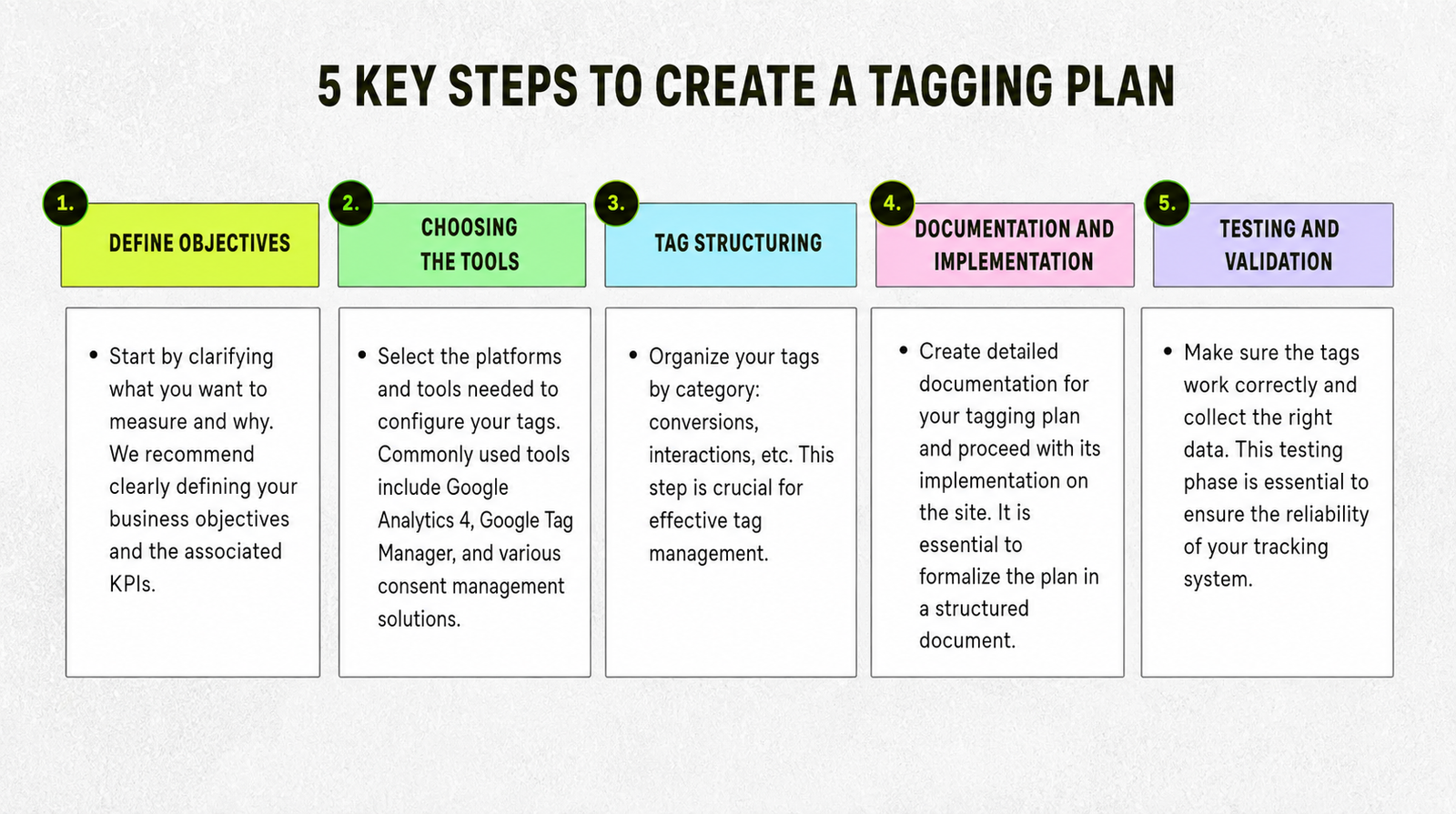
Begin by identifying your website’s primary objectives and selecting measurable key performance indicators. These may include completed purchases, qualified leads, newsletter registrations, appointment bookings, or subscription sign-ups. Next, audit existing tracking scripts and integrations to identify duplicate tags, outdated configurations, and missing events. Document your findings before introducing changes, as this creates a clear starting point and helps prevent existing problems from being carried into a new implementation.
Create a tracking plan that defines event names, parameters, triggers, destinations, and testing requirements. Use consistent naming conventions, such as generate_lead, add_to_cart, and purchase, where appropriate. Configure the required events through your chosen analytics and tag management tools, then test them before publishing. A reliable website tagging strategy should also specify who maintains the implementation, how changes are approved, and when tracking will be reviewed. These responsibilities help keep the framework organised as the website evolves.
Choosing the Right Website Tagging Tools
Google Analytics 4 is useful for measuring website interactions, traffic sources, engagement, and conversions. Google Tag Manager complements it by providing a central interface for configuring tags, triggers, and variables. Together, these platforms can support many common tracking requirements, from recording page views to measuring successful form submissions. Businesses with more complex reporting needs may also consider enterprise analytics platforms or specialist tag management solutions, depending on their technical requirements and available resources.
The best tools depend on your website’s size, business model, marketing channels, and reporting objectives. Before selecting a platform, consider integration capabilities, ease of maintenance, implementation costs, access controls, and support for consent management. Avoid adding unnecessary tools simply because they offer additional features. A simpler implementation that measures important interactions accurately is often more useful than a complicated collection of overlapping systems. Document each tool’s purpose so that future changes remain manageable and unnecessary tracking can be removed.
Website Tagging Best Practices for Accurate Data
Consistency is one of the most important principles of reliable tracking. Establish standard names for events and parameters, document their meanings, and apply the same conventions across relevant website pages. Where appropriate, use a data layer to pass structured information, such as product details, transaction values, and page categories, to your tracking tools. This can reduce reliance on website elements that frequently change and make tracking easier to maintain across different templates and user journeys.
Testing and documentation should remain ongoing priorities rather than one-off tasks. Use Google Tag Manager Preview mode, Tag Assistant, and GA4 DebugView to check whether events fire correctly and include the expected parameters. Investigate duplicate conversions, missing values, and unexpected changes in reporting. Maintain version records and review tracking after website redesigns, checkout updates, or new marketing integrations. Following these website tagging best practices helps businesses identify errors earlier and maintain more dependable analytics as their digital operations grow.
Website Tagging, Privacy and UK Compliance
Businesses operating in the UK should consider how website tracking interacts with applicable privacy and electronic communications requirements. Depending on the technology and activity involved, relevant rules may include the UK General Data Protection Regulation, the Data Protection Act 2018, and the Privacy and Electronic Communications Regulations. Organisations should understand which technologies they use, what information they collect, and whether consent is required before particular tracking technologies can be stored on or accessed through a visitor’s device.
A consent management platform can help communicate visitors’ choices to relevant tracking systems. Google Consent Mode can also communicate consent signals to supported Google services, but it does not replace the need to establish an appropriate consent mechanism or meet legal obligations. Businesses should ensure that tracking behaviour reflects applicable consent requirements, provide clear privacy information, and avoid collecting unnecessary personal data. Regular reviews of permissions, retention practices, and tracking configurations help maintain a responsible website tagging strategy while supporting trustworthy measurement.
Common Website Tagging Mistakes to Avoid

One frequent mistake is installing the same analytics tag more than once, which can result in duplicated page views or conversion events. Another is measuring a button click as though it were a completed business action. Clicking a submission button does not necessarily mean that a form was successfully received, just as beginning checkout does not mean an order was completed. Tracking should reflect the actual outcome whenever possible, with tests confirming that events correspond to genuine interactions.
Inconsistent naming, missing parameters, and poorly documented triggers can also create reporting problems. Teams may struggle to compare results when similar actions are recorded under different event names or when important information is absent. To avoid these issues, maintain a central tracking specification, remove redundant scripts, and validate critical events against suitable source records. Include consent checks in the testing process and review changes before publication. A systematic approach reduces avoidable errors and makes analytics data more useful for everyday business decisions.
Measuring and Improving Website Tagging Performance
Tracking quality should be evaluated by checking whether important events are recorded consistently, whether required parameters are present, and whether duplicate conversions occur. Compare analytics figures with appropriate operational records, such as completed orders or customer relationship management data, while recognising that attribution models and reporting methods can produce legitimate differences. Investigate significant discrepancies before making decisions based on the numbers, particularly when sales, leads, or campaign performance appear to change unexpectedly.
Schedule regular audits and prioritise improvements according to business impact. High-value events, such as completed purchases and qualified enquiries, should receive particular attention because tracking errors can distort important performance measures. Re-test implementations after significant website changes and document the outcome of each review. Over time, these habits help teams maintain accurate measurement, identify emerging problems, and improve their understanding of customer behaviour. A dependable tagging framework supports better analysis when its data is reviewed alongside other relevant business evidence.
Conclusion
A website tagging strategy provides a practical foundation for accurate analytics, meaningful conversion measurement, and informed digital marketing decisions. By defining clear objectives, documenting events, selecting suitable tools, and testing implementations carefully, businesses can develop a tracking framework that reflects their most important website interactions. Consistent naming conventions, reliable data collection, and appropriate privacy controls further strengthen the quality of the information used for reporting and optimisation.
Successful implementation requires ongoing attention rather than a single installation. Regular audits, clear ownership, and testing after website changes help maintain dependable tracking as business requirements evolve. Businesses should begin with their most valuable conversion events, resolve data quality issues, and expand their measurement framework when additional tracking serves a clear purpose. With a well-maintained approach, website analytics becomes a more useful resource for understanding visitors, improving customer journeys, and supporting sustainable business growth.
Frequently Asked Questions
What is a website tagging strategy?
A website tagging strategy is a structured plan for tracking website interactions and collecting useful analytics data.
How do I create a website tagging strategy?
Define your goals, audit existing tags, document events, implement tracking, configure consent controls, and test the results.
Which tools are useful for website tagging?
Google Analytics 4 measures website activity, while Google Tag Manager helps manage and deploy tracking tags.
How often should website tags be audited?
Review tracking regularly and after significant website changes. Quarterly audits can provide a useful starting point.
Does website tagging need to follow UK privacy laws?
Yes. Applicable tracking activities must comply with relevant UK privacy and electronic communications requirements, including consent rules where they apply.
You May Also Read: What Is Express Check out