What Is Express Check out? Benefits, Examples and How It Works
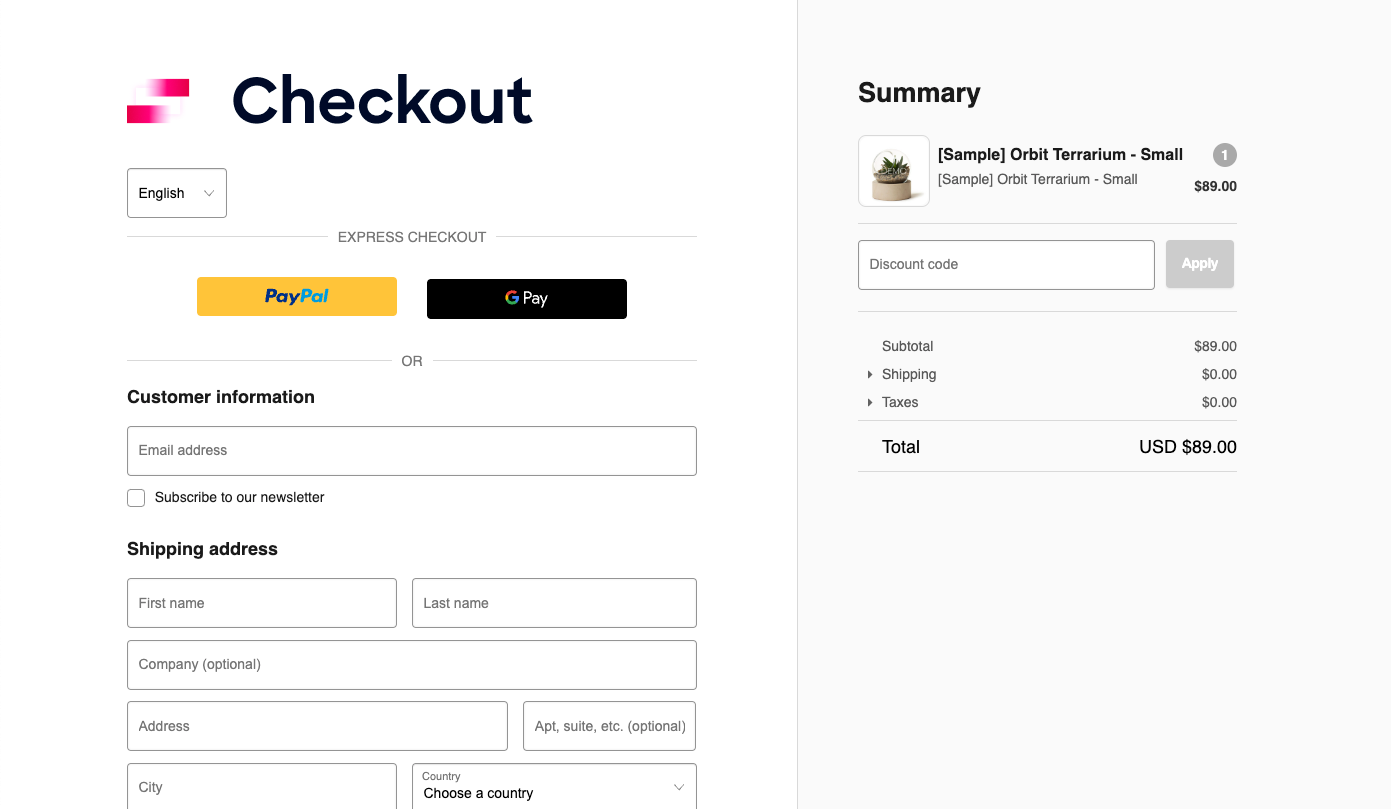
Express checkout is a convenient payment option that allows customers to complete online purchases with fewer steps than traditional checkout methods. Instead of repeatedly entering their name, delivery address, billing details, and payment information, shoppers can use supported payment services that securely manage their saved information. This makes buying products online easier, particularly for returning customers who want a quick and straightforward shopping experience without completing lengthy forms.
For e-commerce businesses, express checkout can help simplify the purchasing journey and reduce unnecessary friction. Payment services such as PayPal, Apple Pay, Google Pay, and Shop Pay offer different ways to complete eligible transactions using saved information and authentication. Understanding how express checkout works, which payment methods are available, and how security is managed can help shoppers make informed decisions while enabling retailers to create a more convenient online buying experience.
What Is Express Check out?
Express checkout is a payment feature that enables customers to complete online purchases using fewer manual steps. Depending on the payment provider, shoppers may be able to select a saved payment method, confirm their delivery details, authenticate the transaction, and place an order without completing every field in a traditional checkout form. The exact process varies according to the retailer, payment service, device, and information already saved by the customer.
Unlike standard checkout, which often requires customers to enter their contact, shipping, and payment information manually, express checkout can reuse eligible details securely stored by a payment provider or digital wallet. It is commonly available on product pages, shopping baskets, and dedicated checkout screens. Although the term sometimes refers to one-click purchasing, not every express payment is completed with a single click, as additional confirmation or identity verification may still be required.
How Does Express Checkout Work?
Express checkout begins when a customer selects an available express payment option on an online store. The payment provider then retrieves the relevant saved information, such as an eligible payment method and delivery address, and presents the details required to continue. Depending on the service, the customer may choose a delivery option, check the order total, or confirm which card or account should be used for the transaction.
Once the customer confirms the purchase, the provider processes the payment and communicates the result to the retailer. Security checks may involve a fingerprint, facial recognition, a verification code, or account authentication. If the payment is approved, the merchant can create the order and display a confirmation. This streamlined process makes express checkout useful for shoppers who value convenience, although availability and the number of steps differ across payment providers and retailers.
Key Benefits of Express Checkout for Online Shoppers
One of the main benefits of express checkout is that it reduces repetitive data entry. Customers who have already saved their payment and delivery information may not need to complete the same fields every time they shop. This can be particularly helpful on smartphones, where entering long addresses and card details is often less convenient than using a supported digital wallet. A shorter process can make everyday purchases feel simpler and less frustrating.
Another advantage is flexibility. Many retailers offer several payment options, allowing customers to choose a service they already recognise and trust. Saved information can make repeat purchases more convenient, while supported authentication methods add a verification step when required. However, express checkout does not guarantee that every purchase will be faster or successful. Customers may still need to update an expired card, enter a new delivery address, or complete additional security checks before an order can be placed.
Benefits of Express Checkout for E-commerce Businesses
For online retailers, express checkout can help remove unnecessary obstacles between product selection and payment. When shoppers encounter fewer forms and simpler payment steps, they may find it easier to finish their purchases. This can be particularly relevant for mobile customers and returning buyers who already have compatible payment information available. Businesses should nevertheless test the effect on their own customers, because checkout performance also depends on pricing, delivery costs, product availability, trust, and website usability.
Express checkout can also support better measurement of the purchasing journey. Retailers can monitor checkout completion rates, failed payments, basket abandonment, and completed orders to identify areas that need improvement. Comparing these measurements before and after introducing a new payment option can reveal whether it provides a genuine benefit. A successful implementation should combine convenience with clear pricing, reliable order processing, accurate confirmation messages, and an alternative checkout method for customers who cannot or do not wish to use express payments.
Popular Express Checkout Methods and Examples
Several payment services provide express checkout experiences, although their features and availability differ. PayPal allows eligible customers to pay through their PayPal accounts, while Apple Pay and Google Pay support payments using compatible devices and eligible saved payment methods. Shop Pay provides a streamlined experience for eligible customers shopping with participating Shopify-powered stores. Each service has its own account requirements, supported payment methods, authentication process, and merchant integration options.
Retailers should select payment services according to their customers’ preferences, target markets, website platform, and operational requirements. For example, a Shopify merchant might evaluate Shop Pay alongside other supported payment methods, while a business using a different e-commerce platform may consider available wallet integrations. Customers should always check the order details before confirming payment, regardless of which provider they choose. A familiar payment logo can improve recognition, but the merchant and payment option should still be verified before a transaction is completed.
Express Checkout vs Standard Checkout
Standard checkout usually guides customers through several fields where they enter or confirm contact information, shipping details, billing information, and payment details. This process remains important for first-time shoppers, customers purchasing gifts for another address, and people using payment methods that are not supported by express options. It also gives customers an opportunity to review delivery choices and other order information before submitting a purchase.
Express checkout reduces manual entry by using information already available through a supported payment service. However, it does not necessarily remove every checkout step, and customers may still need to confirm their address, choose shipping, or verify their identity. Offering both options gives shoppers greater control over the purchasing process. Retailers should focus on providing a clear, reliable experience rather than assuming that the shortest checkout is always the best choice for every customer or transaction.
Is Express Checkout Safe?
Express checkout can provide a secure way to pay online when customers use reputable providers and retailers implement their payment integrations correctly. Payment services may use encryption, authentication, fraud monitoring, and other protective measures to safeguard transactions. Some digital wallets also use device-based verification, such as facial recognition or fingerprints, to confirm eligible payments. These measures can reduce the need to repeatedly enter payment details, although the specific protections depend on the provider and transaction.
Customers should still take sensible precautions whenever they shop online. Check the website address, confirm that the retailer is legitimate, review the final order total, and protect payment accounts with strong authentication. Never share verification codes with someone who contacts you unexpectedly. If a payment appears suspicious or an order confirmation does not arrive, check the account and transaction status before trying again. These habits help reduce risks such as phishing, unauthorised account access, and accidental duplicate orders.
Common Express Checkout Problems and How to Fix Them
Sometimes an express payment option may not appear at checkout, or a transaction may fail unexpectedly. Possible reasons include an unsupported device, regional restrictions, expired payment details, an unavailable card, incorrect account information, or a temporary connectivity problem. Retailer settings and payment provider requirements can also affect which options are displayed. Checking the provider’s availability and ensuring that account details are up to date can resolve some common issues.
If a payment fails, follow the provider’s instructions or choose another available payment method. When the order confirmation is missing, review the transaction history and check for an order confirmation email before attempting another payment. This helps reduce the possibility of placing the same order twice. Retailers should also test payment buttons, authentication, order creation, and confirmation messages across supported devices. Clear error messages and accessible alternatives make it easier for customers to recover from problems without abandoning their purchases.
How to Add Express Checkout to an Online Store
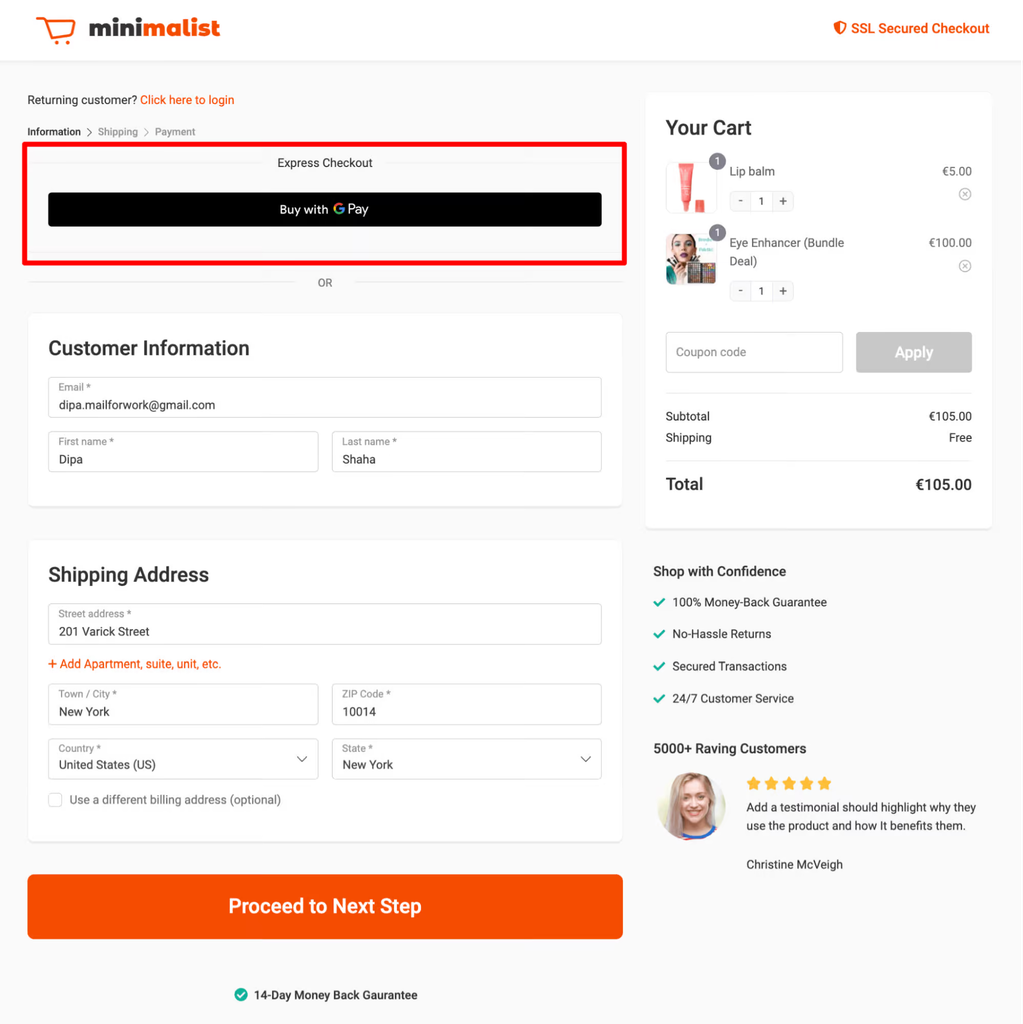
Businesses should begin by choosing a payment provider that supports their e-commerce platform, business location, target customers, and preferred payment methods. Retailers using Shopify, WooCommerce, or another platform should review the integrations available for their specific setup and follow the relevant provider’s instructions. Important considerations include transaction fees, supported currencies, payment acceptance, account requirements, and how the integration handles customer information and order records.
After installation, test the complete purchasing journey before making the option widely available. Check the express payment buttons, delivery information, successful and declined transactions, authentication, order confirmation, and mobile compatibility. Once the feature is live, monitor checkout completion, payment errors, customer feedback, and duplicate orders. These checks help identify technical problems and determine whether the new payment experience is useful. Retailers should maintain a standard checkout option so that customers with unsupported payment methods can still complete their purchases.
Best Practices for Using Express Checkout Effectively
A good express checkout experience should be simple without hiding important information. Retailers should display supported payment options clearly, explain delivery costs and applicable taxes, and make return policies accessible before customers confirm an order. Too many payment buttons can create confusion, so businesses should prioritise methods that suit their customers and work reliably with their website. The checkout design should also remain easy to use on smaller screens and across supported browsers.
Ongoing testing is essential because payment integrations, devices, and website functionality can change. Businesses should review failed transactions, monitor conversion data, investigate customer complaints, and test important checkout journeys after significant updates. Security settings and software should be maintained according to provider guidance. By combining convenient payment choices with transparent information and dependable technical support, retailers can create an experience that serves both returning customers and shoppers who prefer traditional checkout.
Conclusion
Express checkout helps customers complete eligible online purchases with fewer manual steps by using saved payment information and supported authentication methods. Services such as PayPal, Apple Pay, Google Pay, and Shop Pay can make payments more convenient, particularly for returning customers and mobile shoppers. However, the exact experience depends on the provider, retailer, device, and customer account, so additional confirmation may still be required.
For e-commerce businesses, introducing express checkout can reduce purchasing friction and support a smoother customer journey, but results should be measured rather than assumed. Choosing suitable payment providers, testing transactions carefully, maintaining strong security practices, and offering a standard checkout alternative all contribute to a dependable experience. When implemented thoughtfully, express checkout can make online payments more convenient while giving customers greater flexibility in how they shop.
Frequently Asked Questions
What is express check out in simple terms?
Express checkout is a payment option that allows customers to complete online purchases using saved information and fewer manual steps.
Is express checkout the same as one-click checkout?
Not always. Express checkout simplifies payment, but some transactions still require authentication, confirmation, or additional information.
Is express checkout safe to use?
It can be safe when using reputable payment providers, secure accounts, and appropriate authentication. Always check the retailer and order details.
Can I use express checkout without creating an account?
It depends on the payment provider and retailer. Some methods support guest purchases, while others require an account or previously saved details.
How does express checkout help online businesses?
It can reduce checkout friction and improve convenience, potentially supporting higher conversion rates when the payment experience is well implemented.
You May Also Read :Leeds Facts